
This article will focus on the what information we will need from the retailers before we forward them a build for Foodiverse with instructions on what to whitelist on their device network.
📱🥫 Onboarding for retailers to the Foodiverse Mobile App
Android / iOS device with Play or App store permissions:
-
If the retailers are using either an Android or iOS devices that have access to Play or App store then the Foodiverse app can be downloaded from the following links.
-
Android - Foodivese app on Google Play
-
Android / iOS device without Play or App store permissions:
-
If the devices do not support access to Play or App Store, then we would need some more information from your IT team before we send a build of Foodiverse.
Network information
We would require more information from your IT team on how the network is setup for the devices that are going to use Foodiverse.
-
If a proxy layer had been enabled on the mobile devices which communicate with your network. Please do let us know before hand so that we can forward the appropriate build for your devices.
-
In order for the app to communicate to the Foodiverse servers, please ensure that the following urls are whitelisted on your network, including in-store WiFi / intranet.
|
Url’s |
Reason |
|---|---|
|
https://foodcloud.statuspage.io/
|
Platform status information |
|
Foodiverse server |
|
|
Firebase crashlytics |
|
|
Push notifications |
|
|
User Authentication |
|
|
Foodiverse Status Page |
Device information
Please let us know what kind of device will you be using. We support both Android and iOS devices with OS versions:
|
OS |
Version |
|---|---|
|
Android |
Android 7.0 (API level 24) or greater |
|
iOS |
iOS 13.0 or greater |
App Installation
-
As your organisations mobile devices do not support Google play or App store, then our Foodiverse team would send you a custom build for your device.
⁉️ Troubleshooting
In the case that something does not work correctly, please check these options.
-
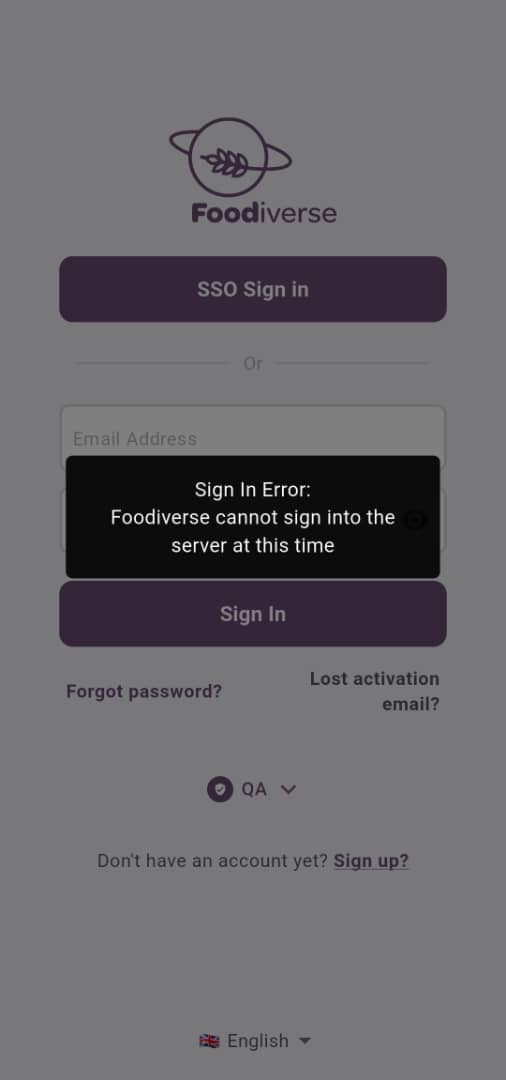
“Sign In Error: Foodiverse cannot sign into the server at this time“
-
Suggestion: If you are trying to login into the mobile app using your email and password and you get a response back saying “Sign In Error: Foodiverse cannot sign into the server at this time”. (Image 1) We would like the users to perform a few steps so that we can narrow down on the problem and get the login feature working.
-
Step 1. - Confirming Foodiverse is allowed on the your Network
-
We suspect that your company network might not have allowed our url’s to pass through your network. So please contact your IT team and ask them to the above URL’s sent. After adding this into your whitelist list, please try the login process on the mobile app and the web app. If the login works just on the web app then please send us a screenshot confirming this.
-
If the login does not work for the web app. Please try to login using a public network (e.g. not your organisations security protected network). If this works then the above url *.foodiverse.net may not have been successfully whitelisted.
-
Step 2. - Diagnosing the Mobile App Error
-
If your mobile device has a proxy settings enabled then please do forward us this information and Ignore the following steps.
-
If there is no proxy on the mobile network then try the following step:
-
-
Now our team will send you an Android APK which will be a Test APK. An instruction would be provided along side on how to provide feedback from the Test APK.